Universal Gamepad turns your Android phone into a configurable controller
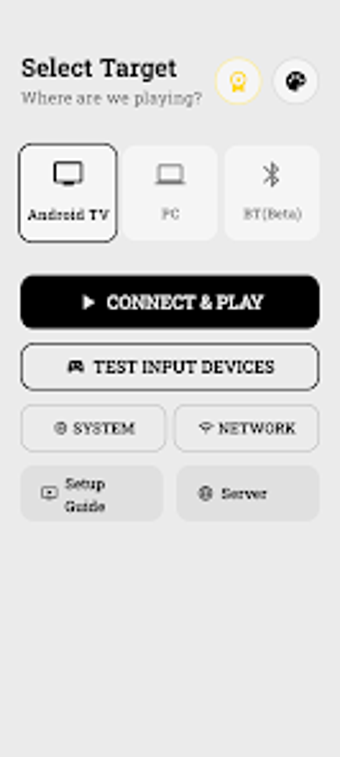
Universal Gamepad by Jeet Studio converts an Android smartphone into a wireless, programmable game controller for desktop and television gaming. The app connects over local Wi-Fi or Bluetooth to deliver low-latency input and a drag-and-drop editor for custom layouts, triggers, macros, motion mapping, and haptic profiles. It supports PlayStation and Xbox icon styles and requires a companion Windows server for PC integration. PC and TV gamers who prefer configurable touch inputs or need a temporary controller alternative get the most value.
What does Universal Gamepad do?
The app converts an Android phone into a programmable game controller that maps touch inputs to keyboard or controller signals. Input options include virtual joysticks, touch buttons, analog sliders, and motion-sensor mappings. These control types let the phone emulate both discrete button presses and continuous analog input, which helps match different game genres. Mapping targets accept standard controller or keyboard events on the device the phone drives.
How reliable is the connection and latency during play?
The developer emphasizes low-latency performance by routing input over local Wi-Fi or via direct Bluetooth pairing; the tool also supports Wi-Fi ADB for TV links. For PC play a lightweight Windows desktop server must run to accept input over the LAN, so latency depends on local network quality and radio interference rather than external cloud hops. Good router placement and a stable channel reduce intermittent input jitter.
Is local-only operation safer than cloud-dependent controllers?
The app does not require cloud accounts, remote servers, or hidden trackers, which limits external data exposure and third-party routing. That privacy-focused design reduces the attack surface associated with remote management. Standard device permissions and Bluetooth pairing still apply, so users should pair only trusted hardware and run the desktop server on a secure desktop to avoid unwanted access from other networked machines.
Do I need technical knowledge to set up advanced mappings and macros?
Edit Mode provides a drag-and-drop editor where you can move, resize, or hide controls, supporting quick layout changes for basic setups. Advanced tasks such as assigning M1–M4 macro bindings, tuning analog trigger behavior, and calibrating gyroscope sensitivity require deliberate configuration and iterative testing. Players who invest time can save multiple profiles; those seeking immediate plug-and-play may face a noticeable setup curve.
Practical recommendation and suitability
For technically minded players who accept an initial configuration phase, Universal Gamepad is a practical tool that prioritizes local privacy and flexible inputs. Casual users seeking instant, hardware-like pairing may prefer a physical controller to avoid setup. Tip: run a short pairing and calibration session before competitive play to verify responsiveness and profile selection. Expect a learning curve when tailoring inputs to match different genre-specific control schemes. Recommended.